Tuesday, September 15, 2020

Khan Academy


    Khan Academy is a personalized learning tool accessible for students and teachers to use as a way to enhance and better understand the content that students are learning in their education. Their mission is to provide free world-wide education for any student seeking an education. The website is K-14 based with specialized courses in math, science, language arts, and many more. 

    Students can use these courses to find videos, interactive activities, and practice tests that are personalized for them and where they are in their learning abilities. Throughout the course, students gain points until they fulfill the mastery level where they then move onto the next section of learning. 

    Khan Academy has a college readiness partnership with the College Board to help students prepare for the SATs where they can take official SAT practice tests, receive instant feedback and interactive tools to help them prepare for the SAT.






QuickTime Player


Apple - Support - Downloads
     QuickTime Player is a software developed by Apple that allows users to play and edit videos, record screen, and do audio recordings. A nice feature with Quicktime player is users have the ability to change one video or audio format to another. For example .amv to .mp4. It can be used for many things such as a video player, image viewer, audio player, and even a virtual reality tool. 

QuickTime players is used by many. It also is very beneficial to teachers and students. Users are able to record screen and even record audio. Teachers can benefit from the software because when they're explaining a subject or topic that requires the use of the internet. It's a lot easier to explain by showing an actual screen footage of it. Students can benefit from the software by using the audio recording feature or even changing the format of the audio or the video. When student have to create a video for an assignment they have the ability to change the format. Not all websites require the same formats for videos. QuickTime player allows the user to change the format they need. I use this software a lot and find it very useful, especially today with how advanced technology is. I would recommend this software for everyone. It works best with Apple computers but versions are available for Windows.

How to screen record on a Mac computer - Business Insider

Here is a link for a short tutorial of QuickTime Player:
https://youtu.be/KV7VzJbnOe8

Monday, September 14, 2020

Edpuzzle

Edpuzzle


Edpuzzle is a great learning resource on both the student and teacher side. Teachers are able to choose videos (whether it is their own, a YouTube video, etc.). They are then able to add questions to the videos to make sure their students are paying attention and are picking up the important information from the videos. It is free and the website says that Edpuzzle is used by more than 50% of US schools. They have a YouTube extension, an app, and a blog, so there is something for everyone.

I have used Edpuzzle a lot in the past, mostly for my high school Spanish class. My teacher would choose a YouTube video with Spanish speakers talking about something relating to the subject she was teaching at the time. She would add questions asking about all sorts of things ranging from just general content to deeper meaning. This platform really helped her to see which students were struggling, which ones needed more time, etc. It also made it easy for her to give us participation points, because Edpuzzle automatically grades the multiple choice questions. When she added short answer questions, all she had to do was go back into Edpuzzle when we were done and give us a grade herself.

From the student perspective, when we were given Edpuzzle assignments, I knew it would be a good day. Edpuzzle was a lot more interesting than the standard reading and writing assignments. I would pay a lot more attention, and I found myself learning more when I was listening to the app and answering questions right away. On top of this, Edpuzzle is extremely user friendly. All I had to do was open the app, choose my class and assignment, and the video popped right up on the screen. Overall, I personally really like Edpuzzle, because it was something different than the normal day to day activities we would usually do in class.

                                                        Edpuzzle

DISCORD: Better Connections as a Student


 Hi, guys so I’m sharing a Platform I use regularly, Discord. Discord is a  Group-Chatting platform that’s most popular among gaming circles but it can be useful as a student. Discord can be useful for setting up study groups and the Site offers a template shown below.


The premade template comes with a variety of rooms with the # Symbol dictating text-only channels and the 🕪 symbol indicating voice channels. I find Discord a bit better for planning events than snap chat as you can separate information into clusters as opposed to everything being in one long group chat conversation on something like Snapchat or WhatsApp. Using something like the “homework-help” channel and having everyone use that channel for homework exclusively and another for scheduling group calls cuts down on clutter significantly and would allow for information to be accessed more readily regardless of what form of technology a person is using as Discord is on PC and Mobile devices. I also find it's messaging less clunky than Canvas because it was made for instant messaging as opposed to Canvas which mimics emails. Along with just being a good form of chatting Discord also has some public servers revolving around Languages like Chinese, English, Latin, Japanese, etc. and even communities dedicated to coding languages. Along with a Plethora of bots like Rythm, which can play qued music, and MEE6 which tracks and rewards participation in a Server. Here’s an article which looks at Discord as a Platform: https://www.businessinsider.com/what-is-discord Here’s an explanation on how to make a server and some other FAQ things from Discord directly: https://support.discord.com/hc/en-us/articles/204849977-How-do-I-create-a-server-

Discord Logo Image Source: https://discord.com/branding 

Sunday, September 13, 2020

Quizlet

 Chances are, you’ve heard of Quizlet. But--did you know that it’s more than just flash cards?


Not only does it let you make your own flash cards; it gives you different options to learn with those flash cards. 


For studying, here are the options that Quizlet offers:

  • Learn: Quizlet shows you the term or definition (your choice) and you have to type the answer from the other side.

  • Write: Similar to the Learn feature, but it gives you a summary on the left side of the screen that tells you how many you got correct, incorrect, and how many in the set that you still need to study.

  • Spell: This is perfect for ELA students with spelling tests! It gives you an audio autoplay of the term, and you have to spell what you hear.

  • Test: It takes your set of flash cards and formats them into a test. You can choose a variety of question types, including: written, multiple choice, and true/false.


If taking a more active approach is more your style, you might prefer to try one of these features:

  • Match: Quizlet times you as you match term and definition.

  • Gravity: You’re given an options menu before starting, where you can choose what to study (starred vs. the whole set), whether to answer with term or definition, and difficulty. One side of the card is displayed on an asteroid and you have to type the other in the response box before it hits the ground. It gives you a score and level on the left side of the screen to track your progress.


Teachers can also “create a class” within Quizlet, which allows students to access those sets created by the teacher. Quizlet gives more ideas for Quizlet classes at the link below:
https://quizlet.com/blog/how-to-use-quizlet-classes-like-a-pro

Kahoot!


Kahoot! Play & Create Quizzes - Apps on Google Play

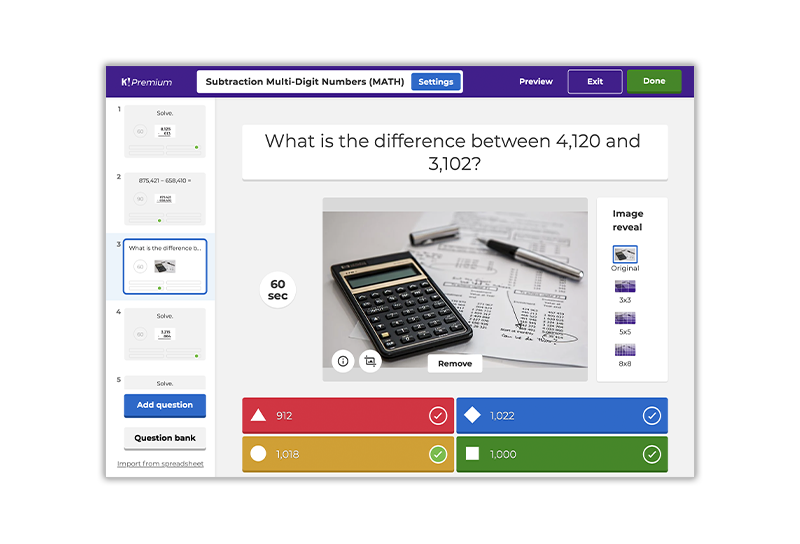
Kahoot is a game-based learning where it tests your knowledge on the different topics your teachers give you. Teachers usually use it for review games before having  a test or quiz. Its a series of multiply choice questions you answer in a selected amount of time. Kahoot is good tool to test how much you have learned about that topic and if you are ready for the test or quiz. Students play against one another and push themselves that they now this information as the person who is leading (on top). To be leading, you keep building up points, which is ranged from thousand (plus more) to zero, by getting the questions right more often then getting them wrong. Once every question has been answered you will get to see who the leading three players were. 

To play Kahoot, you can either download the Kahoot app or go to kahoot.com/what-is-kahoot/. Once on the website, click the play button on the upper right hand corner. When there it will ask you for a game pin, put the number that your teacher gives to the class (usually six numbers), and your name. After you press enter, you have joined the Kahoot game.

Kahoot! for schools: how it works | Feature overview

Kahoot is a fun way to review for an upcoming quiz or test. It helps students think quickly like they are actually taking the test, so they can finish in the time slot they are given. Good thing about it is that you get to compete with your friends, like a friendly competition. Kahoot help keep students engaged in learning and students participate. The one thing that most students love is the Kahoot music that plays the whole time. Kahoot is an amazing tool that helps out so many students do well on there tests if they pay attention.

https://www.youtube.com/watch?v=hnnUD9-hD8A (Music when you first enter in)

https://www.youtube.com/watch?v=CszcxXclhDk (Music when you are answering the questions)

Google Classroom

     Although Google Classroom has been used in the education world since 2014, it has been very popular this school year in the time of the pandemic and a ton of virtual learning and teaching. Google classroom is very versatile and easy to navigate for all who are brand new to it. Both teachers and students can manage multiple classes on their Google Classroom account by gaining access to each class through a special class code. This platform comes with many useful features for online-teaching such as video chatting called “Google Meet”. Group-vIdeo chatting is very popular in education right now due to the need for face-to-face time in the online school day. 

Google Meet, Google's Zoom competitor, is now free for everyone | Ars  Technica

Google Classroom has great communication tools such as messaging during video calls to enhance discussion as well as group and individual chatting. Teachers are able to create assignments, quizzes, topics, and questions. The best part is that all of these features come with a lot of modification and editing abilities that make them perfect and customizable to every classroom and student. The entire layout of Google Classroom is very organized and simple.

Bring Learning to Life with Google Classroom - SADA | Cloud Technology  Services | Google Cloud Premier PartnerGoogle Classroom

Using Google Classroom, teachers are easily able to provide feedback on students assignments and quizzes using multiple editing tools. Teachers can also complete all grading using this platform. Teachers are able to link parent/guardian contacts to all students on their digital list and send out group or personalized messages directly to the parents/guardians. And just when you thought it couldn't get any more convenient for both teachers and families, you find out there is, of course, a Google Classroom mobile app. 


Google Classroom on the App Store