Sunday, September 13, 2020

Quizlet

 Vote for Quizlet for Google Play Fan Favorite App of 2018! | Quizlet 

Quizlet is a website/application that was made for students to study and for teachers to provide additional resources that students cannot get in the classroom. Students can study any subject while using Quizlet. When students go to use this website/app, they will have to choose a study set. A study set is basically a folder of the exact content of work that the students are looking for. Teachers or other users are able to provide the study sets by simply creating them. Quizlet is free and is very customizable so that teachers can provide for their students in a way that they are comfortable with and is considered their style of teaching. With that said, all grade levels are able to use Quizlet. Quizlet isn't a website where all the students do is read articles. This website provides fun and useful activities to keep students learning and motivated. The activities are flashcards, write, learn, match, test, and gravity. Those are all options for the teachers to create and for the students to select whichever one is able to help them study and learn. This also saves some classroom time. Instead of a teacher having to make a part of her workday a review portion for any test or quiz, the teacher can simply suggest this to the students or even assign a Quizlet test. The test wont be graded but it will give the students a sense of how the real test will be when they do end up taking it. The flashcards portion also is a great option. With the flashcards you can shuffle them, click on them one by one, and you can quiz yourself with them. Teachers can make their own Quizlet account and have it open for the students to view but students are also able to view other accounts as well, if thats what they feel will help them learn. Overall Quizlet is a great website for students to access learning ideas and for teachers to introduce new teaching methods. 

Saturday, September 12, 2020

Class Dojo

    When thinking about useful technology apps that can be used in a classroom, the first one that comes to my mind is called ClassDojo. 

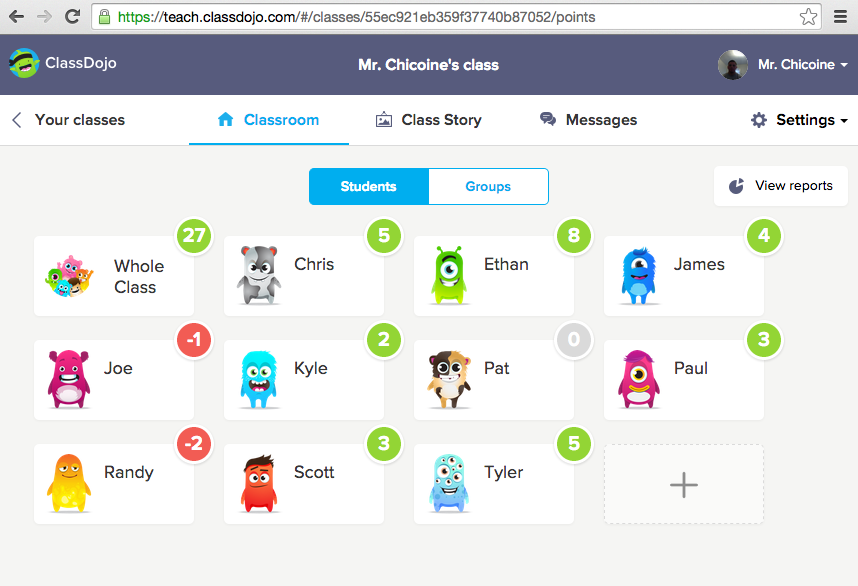
    ClassDojo is a free classroom app that can be downloaded by parents, students, and teachers.  It’s goal is to help spread information such as pictures, videos, and messages from the classroom to a student’s home.  The app also allows for students to create their own avatars and be able to earn points during class time.  This is a great way to keep students engaged and excited about their own learning.  It is also an excellent way for students to be able to track their own progress throughout the year, and take responsibility for their own academic success. ClassDojo is available on almost all devices such as tablets, desktops, smartphones, and much more.  The app can be customized by teachers to be able to send classroom updates, direct messages to parents, and add to different school story boards.  ClassDojo also offers a language translation feature that can help remove language barriers between the classroom and a student’s home. 

    I personally have used ClassDojo as a student in one of my first college classes.  It was a very useful app and made it easy for me to communicate with my teacher if I wasn’t in the classroom.  I also liked that the app was user friendly, easy to download, and was very customizable.  I have heard many positive comments about ClassDojo from others, and I definitely plan on using it in my own classroom one day.


    For more information about how to navigate the ClassDojo app, visit ClassDojo”s YouTube channel:  https://www.youtube.com/channel/UCxgOUb7t6VTS0-TPSPInBpg


EdOptions Academy Online Classroom

 During the current pandemic, many K-12, as well as college students, are trying to adjust to a fully online classroom experience; however, I am not new to the scene. I learned via online classrooms for almost six years of my secondary education, so I would like to provide an overview and critique of a program that I was a part of for three of these years: Edmentum’s EdOptions Academy.


Edmentum, as a company, offers a variety of products revolving around education, from classes and materials that supplement traditional learning to assessment tools to full-time online school, which is the product I will be discussing today. Their EdOptions Academy works with public schools and can be purchased by the district, thusly students enroll through their public school system, and will receive their diploma from that district’s high school. EdOptions Academy does provide certified teachers for every offered class; however, districts can choose to use their own teachers. That is, students would still follow the lessons, tests, and other resources designed by Edmentum, but their local teachers would oversee their work, grade assignments, and answer students’ questions.


While this flexible teacher option may seem appealing, I feel that this is one of EdOptions Academy’s greatest downfalls. My high school opted for this choice, and I found that the problem was my teachers lacked interest in my learning. They taught full-time at the high school, so they had little time left to devote to their online students. My assignments would not be graded for a very, very long time, and my questions would often go unanswered until it was too late. I even had a teacher tell me that he has a lot of traditional students, so he apologized if he rarely checked EdOption Academy. Additionally, because the curriculum is already developed and laid out, most of my teachers did not even know what I was working on in my classes.

I feel that this Edmentum should not allow school districts to assign their own teachers to classes. Though I do not have experience taking classes under their provided teachers, I feel that it would be a much better chance to learn because the teachers know the curriculum and are not overloaded with traditional classes.


Despite the teacher-based downfall, I truly love Edmentum’s EdOptions Academy as a learning technology. Their lessons are very informative and have many features within them to keep students engaged, such as videos, graphics, interactive questions/practice assignments, links to articles, a built-in notepad, and a “read to me” option. I feel that these prepare you well for the following mastery test, which is a 5-question quiz that reviews what you just learned. In addition to daily lessons, most class curriculums involve weekly projects and discussions, games that review the material, unit tests, and final exams. I feel that this variety of methods to absorb the material helps students that learn if different ways fully understand the topics covered.


Another huge pro to Edmentum’s EdOptions Academy is that it allows students to work at their own pace. It provides tools for tracking progress and monitoring how much time you devote to each class (including a little cartoon man that changes colors and the pace in which he runs/walks based on your progress), as well as due dates for each assignment and test, but it allows students to work as far ahead as they would like. I often utilized this opportunity to give myself long weekends and extended holiday breaks. Additionally, coursework can be done from anywhere, as long as the student has a computer and internet connection. This time flexibility is what makes this program appeal to families who have unique schedules but are uncertain about traditional homeschooling or straying from Common Core standards.


Overall, I believe that Edmentum’s EdOptions Academy is a fantastic program for an online classroom. It offers an easy-to-follow curriculum for young learners that provides them with the knowledge they would gain in a traditional school, but with more flexibility regarding when and where they will learn. More and more students are switching to online means of learning (I even heard from one of my old teachers that the number of children in my school district using Edmentum jumped from 100 in the 2019-2020 school year to over 800 this school year!), and I feel that Edmentum’s EdOptions Academy sets a high standard for what online classrooms should be like.


You can learn more about Edmentum and its array of learning tools here

Friday, September 11, 2020

Canvas

     Although this program isn't necessarily new, it is new to me, as a freshman to UM Dearborn. I thought I would explain, and share my opinion on canvas; how my teachers, my classmates, and I use canvas, and how we cope with the workload. First using canvas, It looked very complicated, and was often overwhelming to me, as I missed many assignments as they were posted, due to the lack of direction. While looking at all the different tabs on the side, as well as all of my different classes, I truly felt like I was at college now.

 The workload truly fit the intimidating name that is college. However, after being invited to friendly group chats on Whatsapp with my peers, and receiving some guidance, canvas didn't seem so bad. My classmates who seemed to grasp the way this app works were the leaders, who created the separate chats. (Invitations were sent through canvas as well, with its chat feature.) I quickly began understanding what each tab meant, and I caught onto my workload. 


Canvas seems very similar to other apps and websites I have used for educational purposes before; Such as Google classroom, and even Edmodo. Since everything is online currently, Canvas is a useful tool for communicating between students and their teachers.


Game-Based Learning

      Game-Based Learning (GBL) and Gamification – Helix Helezon : Erasmus+ K101  Course Center

Game-Based learning has been around for years, taking on the form of both physical gaming and virtual gaming.  Game-Based Learning revolves around the idea of repetition, failure, and the accomplishment of a desired goal (Cahill, “Why Game-based Learning?”).  Gamers are trained to complete levels in order to move on.  This need to successfully complete a level trains them to continue on and develop their skills in order to be successful.  This methodology can also be applied to a classroom setting.  Seeing that many schools around the world have transitioned to online learning, considering this method of teaching can be very beneficial for teachers.  Creating assignments that the class will participate in on a consistent basis can be very difficult; however, if they are presented with an assignment that simulates one of their favorite past times, their willingness to participate will increase.  The development of an assignment that creates a sense of competition among students will make them more inclined to take the time to finish and do everything correctly in order to win.  In doing so they are developing their skills in the class and retaining the information more efficiently.  By applying the Game-Based Learning tactic to a classroom, students will also be working towards a goal that will help them in the long run when they leave to go to the real world. 

                      Seven Reasons to Pilot a Game-Based Learning Unit - John Spencer


            Game-Based Learning has become a very popular way of learning over the years and when comparing it to old ways of learning, it can be seen as more effective.  Considering schooling is now online for many, the more logical way of teaching would be Game-Based Learning in comparison to textbook learning.  Textbook learning is an older way of learning that can limit the information that a student is learning.  Many textbooks that students are reading from don’t have updated information so as a result students will be retaining information that is old and possibly discredited.  With Game-Based Learning, students will have more access to current information given that technology, specifically the internet, is always updated.

            While Game-Based Learning appears to students as a cooler way of learning, teachers are viewing it as an opportunity to make a difference in education.  There are a lot of things that are considered when developing a Game-Based Learning assignment, one of which being the curriculum that is taught.  Teachers must find a way to incorporate their lessons into each game so that the students are getting the most information possible.  The next step would be to develop the game itself.  This step requires teachers to work with writers and other database and gaming experts to come up with an effective and successful game that incorporates all aspect of the lesson that needs to be taught.  

            Overall, Game-Based Learning is an advancement in education that needs to continue to be developed because it is an effective way to reach students in their personal and comfortable environments.


Why Game-Based Learning?


Blog Post #1 ZOOM


All About Zoom


Hello everyone! I am writing to share with you all some information on using zoom. I am currently using zoom daily for virtual teaching in Wyandotte, MI. First of all, let me just say that when I first started to use zoom, I was confused...but now I understand it. Zoom is a way you can chat using voice, video, and chat rooms. Zoom also has break rooms you can set up automatically or manually. Break rooms work great for small/large groups. For example, during math in 3rd grade, both teachers split up the students and worked with them to better understand the lesson. So, how do you use zoom? The first step is to go to www.zoom.com and create an account. Then you can play around with zoom and either join or create your own meetings. You will receive your own zoom meeting account number. You can create recurring on-going meetings or single simple meetings. When you host a meeting, you will automatically be the host, where you are allowed to mute, stop videos, share screens, and create break rooms. Once you have created a meeting, you can directly send the invitations to anyone's email address.. Those who receive these invites can simple click on the link at the time it starts and join your meeting. Using zoom is very productive in hosting classroom sessions virtually, so far, so good!


 Please use this link I found on YouTube to help you understand zoom even better! https://www.youtube.com/watch?v=FnFSBjFvK2o